Skip to content

Jafet's Blog

Welcome to my blog, where I mainly talk about technology, philosophy, sports, or a combination of all three.

All blog posts will populate below. If you want to focus on a specific post, just click on the title and it will navigate to the correct post.

All blog posts are displayed in reverse chronological order, meaning my most recent post will show up first.

If you're on desktop, you'll be able to search through categories on the left pane.

Write to me if you have any comments or concerns: {firstname}{lastname}@gmail.com.


Jafet's 2025 Tour de France preview

Tadej speeding past a fan

General Classification (Overall)

This year's Tour de France has the potential to be a firework filled fiasco, or just-another-day for a certain Slovenian superhero. If Tadej Pogacar's season ended today, most would still consider it to be a success. Tadej has won almost every race that he has showed up to this year, conquering the Spring Classics and the early season races. You can count the number of cyclists racing in this year's Tour de France peloton who have beat him this year on one hand, and have a few fingers left. However, it's undeniable that Tadej has his eyes set on the biggest race of the cycling calendar, so don't expect Tadej to show up complacent and unprepared.

Tadej is not the only generational talent who has their eyes set on the maillot jaune. Danish dynamo Jonas Vingegaard is hungry for vengeance after an injury laden season and a disappointing but still impressive performance at last year's Tour de France. Jonas has been unlucky and crashed early this season, with very few race days compared to Tadej leading up to this year's Tour. However, it would be foolish to discredit Jonas, as he's been the only other cyclist capable of staying close to the dominant Tadej so far.

Slovenia has been not only blessed with one great Tour de France contender, but two. Experienced veteran Primoz Roglic is also looking to win his first maillot jaune, even though it seems like his best seasons may be behind him. Last year's Vuelta winner crashed out hard at this year's Giro, with more crashes than stage victories. Although recent performances might make some discard Primoz, few cyclists in history have been more sucessful in Grand Tours than Primoz.

To call Remco Evenepoel a rookie is a bit misleading, but it is only Remco's second time at the Tour de France. An impressive podium at last year's race finally silenced the doubters, if there were any. Remco seems to be the best of the rest, whereas Jonas and Tadej are on another level. What makes Remco special is his personality and racing style -- aggressive, fast, and fun. Let's see what Remco has in store for us this year.

Sprinters (Green Jersey)

Sprinters at this year's Tour de France have to be versatile and be capable of climbing decently well. A couple of sprinters to keep your eye on during the first two weeks are Jonathan Milan of Lidl-Trek, dynamic duo Jasper Philipsen and Mathieu van der Poel of Alpecin–Deceuninck, and Tim Merlier of Remco's Soudal-Quickstep.

Americans

A few Americans to keep your eyes on: super-domestiques Matteo Jorgenson and Sepp Kuss of Visma, Quinn Simmons of Lidl-Trek, and Neilson Powless of EF Education First. The American most likely to win a stage in my eyes is Matteo or Neilson, while the other two most likely will be supporting their teams and fighting for breakaways. Neilson outsprinted living legend Wout van Aert earlier this season, and Matteo won his second Paris-Nice after Jonas abandoned the race.

Team Classification

The best overall team has to be Tadej's UAE Team Emirates. However, dodgy tactics at this year's Giro by the strategists of UAE may raise some concerns, but it would be difficult to believe Tadej does not choose his own race strategy and tactics. Joao Almeida, Adam Yates, and Marc Soler are the honorable mentions for a top 10 finish in the race.

Summary

The favorite overall is without a doubt Tadej Pogacar, but keep an eye out for the polka dot jersey competition as there are some excellent climbers showing up to this race who will not be focused completely on general classification in weeks 2 and 3. The green jersey competition will be fun to watch as well, as last year's Biniam Girmay looks a bit cold leading into the race, hopefully meaning good competition amongst the sprinters. Finally, the young rider competition will be fun to watch as well, as both 24-year-old Florian Lipowitz and 18-year-old Paul Seixas had strong showings earlier in the season.

Can't wait for the next few weeks!

Using Github Actions to deploy an Astro app to S3

If you have trouble viewing the images in this blog post, turn on light mode in the upper right corner of the page.

This blog post, along with this site, are hosted on an AWS S3 bucket. But how do I develop a new blog post, test it out locally, and then deploy those changes to my S3 bucket without manually uploading each file?

No need to wonder. I'll show you!

1. Create a new user with proper permissions in AWS IAM

First step is to create a user that the Github Actions virtual machine will use programmatically. I wouldn't recommend to recycle an existing user for this purpose, especially if that user is attached to other services. If something were to go wrong, it would be easy to revoke access from only the Github Actions user without it interfering with any of your other services.

Log into your AWS console and go to the AWS IAM user interface to create a new user.

Once you've decided on a cool name, attach the AmazonS3FullAccess policy to this user.

Create user in IAM

Afterwards, click on Create access key and finish through the dialog box options. Afterwards, copy your access key and secret key.

Create access key

2. Add AWS access and secret key to your Github repository

After generating your keys, navigate to your Github repository and add your secrets to your repository (Settings > Security > Secrets and variables > Actions).

I named my access key AWS_ACCESS_KEY_ID and my secret key AWS_SECRET_ACCESS_KEY. You can name yours whatever you'd like, just keep it consistent when you add it to your Actions workflow YAML file later.

Add keys to repo

3. Create a new Actions workflow using YAML file

Caution! The Post-deployment step below is optional, but was required for my use case. This piece of code will make all of the objects within the S3 bucket public. For my use case, I'm okay with that, but be careful using this code as it will make anything in your bucket public. Please do not use this if you have any sensitive data in your bucket!

To create a Github Actions workflow, add a new YAML file in ./.github/workflows in your repository. I named my file main.yml but you can call it whatever you want.

Here's the complete .yml file:

name: Deploy website
on:
  push:
    branches:
      - master

jobs:
  deploy:
    runs-on: ubuntu-latest
    steps:
      - name: Checkout
        uses: actions/checkout@v4

      - name: Setup Node
        uses: actions/setup-node@v4

      - name: Cache 
        id: cache
        uses: actions/cache@v4
        with:
          path: |
            public
            node_modules
          key: ${{ runner.os }}-cache

      - name: Install Dependencies 
        run: npm install astro

      - name: Run Build 
        run: npm run build

      - name: Configure AWS Credentials
        uses: aws-actions/configure-aws-credentials@v4
        with:
          aws-access-key-id: ${{ secrets.AWS_ACCESS_KEY_ID }}
          aws-secret-access-key: ${{ secrets.AWS_SECRET_ACCESS_KEY }}
          aws-region: us-east-1

      - name: Deploy static site to S3 bucket
        run: aws s3 sync ./dist s3://${{ secrets.S3_STRING }} --delete

      - name: Post-deployment 
        run: |
          output=$(aws s3api list-objects-v2 --bucket ${{ secrets.S3_STRING }} --query "Contents[].Key" --output text)

          for key in $output; do
            aws s3api put-object-acl --bucket ${{ secrets.S3_STRING }} --key $key --acl public-read
          done

The on parameter forces this Action to only run when there is a push to master branch.

The steps below all relate to downloading files to the virtual machine's local files, caching for efficiency, and creating the build for the deployment. - Checkout - Setup Node - Cache - Install Dependencies - Run Build

The Configure AWS Credentials step uses an AWS verified Github Action to authenticate the Github Actions virtual machine with AWS using the previously created user. It's important to use the same names that you used when you added the secrets to the repository secrets in step 2.

The Deploy static site to S3 bucket step deploys the files in the dist folder in the virtual machine. Remember that dist is the build result created by npm run build. The --delete flag deletes any leftover files in the bucket that do not exist in the source directory.

The S3_STRING secret is nothing but the name of your bucket. I parameterized it, but you do not have to if it's not a concern for you and your specific use case.

4. Test your new Github Actions pipeline

The YAML file specifies to only trigger the pipeline when a new push occurs to master branch. However, in many enterprise scenarios, you have to go through a pull request review process before merging and integrating your changes to master, so you can remove the trigger or specify something else if you'd like to test your new Github Actions workflow.

If successful, you should see something like the following in the Actions tab of your repository:

Actions screenshot

And, for a more detailed look into the workflow, you can click on that specific run:

Actions screenshot detailed

5. Enjoy the hours saved by going outside or doing something fun

Hope you enjoyed it! Feel free to reach out to me on any of my links on the home page if you run into any trouble following my guide.

Why REST APIs are not ideal for analytics

Have you ever thought that too much of a good thing can be a bad thing?

I have this thought a lot -- with chocolate especially, but I rarely ever have this thought with data. In today's world, the more data, the better. But recently I've been doing a lot with social media APIs, and most of these APIs are surprisingly difficult to use for analytical purposes.

If you're not familiar with APIs, REST APIs are the most prevalent form of API protocols. Gone are the days of XML and other forms, REST is now king.

Now I'm no expert in APIs nor an API developer, so forgive me for my rudimentary explanation, but generally how REST APIs work is that they accept different methods to interact with the API; most commonly used methods are GET and POST. You can make these GET or POST requests to predefined endpoints, sometimes with parameters that you can pass, like an offset or limit parameter. Endpoints will almost always return a predefined response, too.

Take this made up example of 2 endpoints. 1 endpoint for customers that always returns the customers name, email, and address, and 1 endpoint for transactions that always returns order details, product details, and the customer who placed that order.

GET /api/v2/users

Response:
{
    "customerId": 9,
    "firstName": "John",
    "lastName": "Doe",
    "email": "john.doe@me.com",
    "address": "123 Neighbor Rd, Made-up Land, USA 12345"
}
GET /api/v2/orders

Response:
{
    "orderId": 1,
    "customerId": 9,
    "product": "Chamois Butt'r",
    "productId": 1
}

What if you wanted to only get the customer's email and the product ID of a specific order without having to make two separate API calls and receiving / requesting irrelevant bytes of data? Well, you can't really do that with most REST APIs. You would have to make both calls to two separate endpoints and parse the data that you wanted while discarding the rest (get it?).

This is problematic when you are trying to use an API designed for transactions for analytical purposes, and even more so with API limits and quotas. Imagine you have to pull 3 million instances of customers every day but the endpoints return too much data, meaning you have to paginate to get through all records successfully. So one call to the endpoint returns only 10,000 customers at a time, meaning you need at a minimum (3 million / 10,000 customers) API calls to get the entire batch (a lot), and even when you do get to the end of the pagination, you discard 90% of the data from each request! Too much waste, if you ask me.

GraphQL, on the other hand, allows you to very specifically state what you are looking for against the database without having to request from only one endpoint at a time. So, if we wanted to grab the customer's email and the product ID within an order, we could do so without having to make two separate calls to each endpoint. Here's what the request might look like:

GraphQL Query

{
  orders {
    id
    products {
        id
    }
    customers {
      email
    }
  }
}
Response:
{
    "data":
    {
      "orders": {
        "id": 1
      },
      "products": {
        "id": 1
      },
      "customers": {
        "email": "john.doe@me.com"
      }
    }
}

Much more efficient! You get all the data you need, without any of the extra fluff, in less API calls. However, you may need better parsing, but will definitely save you tons of traversing through multiple endpoints and multiple pages to get the data you need.

Now what can be done when trying to get a social media company to develop a GraphQL API rather than a REST API? Little to nothing, but if every API was GraphQL-like, then the world would be a much better place... and you would have to write less requests.

Using dictionaries to call functions in a metadata driven framework

Consider this: you've been tasked at work to come up with a solution for dynamically calling functions depending on different criteria in a metadata table. Let's say this table contains an object name, a "rule" that maps to a specific function, and any parameters for that function.

How would you go about solving this problem? Here's how I did it:

Here's an example of the aforementioned metadata table: | object_name | rule | parameters | | --- | --- | --- | | dim_customer | create_composite_key | {'key1': 'foo', 'key2': 'bar'} | | dim_customer | clean_email_address | {'column1': 'baz', 'audit': True} | | dim_products | create_composite_key | {'key1': 'qux', 'key2': 'corge'} |

Now, here's examples of the functions that need to be called for each entry in the tables above:

def gen_comp_key(df, key1, key2):
    df = df.withColumn('composite_key', concat(col(key1), lit("-"), col(key2)))
    return df

def clean_email(df, column1, audit):
    if audit:
        df = df.withColumn('email_address_clean', trim(col(column1)))
        return df

Now that we have these functions defined, we need to create a dictionary to house these functions that map to the metadata "rule" columns. Notice we store the function references (without parenthesis and parameters) and not the function executions.

dispatcher = {
    'create_composite_key': gen_comp_key,
    'clean_email_address': clean_email
}

Notice how we have stored the functions as the values and the "rule" column in the metadata table as the key. Now, let's call the functions dynamically based on the contents of the table above:

rows = [
    ('dim_customer', 'create_composite_key', {'key1': 'foo', 'key2': 'bar'}),
    ('dim_customer', 'clean_email_address', {'column1': 'baz', 'audit': True}),
    ('dim_products', 'create_composite_key', {'key1': 'qux', 'key2': 'corge'})
]

for row in rows:
    for obj, rule, params in row:
        dispatcher[rule](df=df, **params)

In the above, the dispatcher is our dictionary containing our functions. We call the dictionary containing the functions using the inputs from our table, both the rule name and the parameters for each respective data object, without explicitly calling the functions!

How I built a micro data lake on S3 using AWS, DuckDB, and Streamlit

If you have trouble viewing the images in this blog post, turn on light mode in the upper right corner of the page.

For my 24th birthday earlier this year, my girlfriend gifted me a BirdBuddy. I instantly fell in love - going to my local bird store, buying bird seed, pole, and the adapter for it. The really cool bit of all of this is that the BirdBuddy app produces a lot of data about your feeder and the birds it captures. So, naturally, I started to think about all the interesting things I could do with this data: I could make my own data lake, I could create visualizations and graphs, or I could maybe even deploy my own bird watching companion app with all of the above!

Now don't get me wrong, the BirdBuddy app is amazing, intuitive, and really user friendly, but the way it is set up is kind of wonky. The app captures a sighting of a bird as an event, but doesn't always save this event so that you can store it forever. "Sightings" are ephemeral and disappear after a few days if not saved into what BirdBuddy calls your "Collection". So, that means, that if you don't save all of your Sightings into your Collection as they occur, chances are you'll lose that data. For obvious reasons, I wanted to store my sightings data in a permanent solution, which meant extracting that data from the BirdBuddy API into my own data environment, and begin to visualize the data in an application. That's where the fun part starts.

BirdBuddy API and pybirdbuddy

The BirdBuddy app uses a GraphQL API to pass data around, which means, we can use the same API to make GraphQL calls to extract the data. Huge kudos and thanks to jhansche on Github for pybirdbuddy, which provided a lot of code that made authenticating and interacting with the BirdBuddy API simple and easy. You can read more about the Python library in the github repository.

My goal through using the API was to extract all sightings data and store it permanently so it wouldn't be deleted, and to have a raw data layer in S3 full of bird sighting data and images. Here's an example of what the response from the API for a sighting would look like:

"sightingReport": {
"reportToken": "string",
"sightings": [
    {
    "id": "65b43d02-e159-4ef1-a61a-b37a37b29ecd",
    "matchTokens": [
        "string"
    ],
    "__typename": "SightingRecognizedBirdUnlocked",
    "color": "PINK",
    "text": "Knock, knock! Looks like you've got a new first-time visitor!",
    "shareableMatchTokens": [
        "string"
    ],
    "species": {
        "id": "string",
        "iconUrl": "https://assets.cms-api-graphql.cms-api.prod.aws.mybirdbuddy.com/asset/icon/bird/a80b2a00-9a49-46ed-b5f1-5e7bde4b8267_house%20finch.svg",
        "name": "House Finch",
        "__typename": "SpeciesBird",
        "isUnofficialName": false,
        "mapUrl": "https://assets.cms-api-graphql.cms-api.prod.aws.mybirdbuddy.com/asset/map/bird/d8c20684-d366-4933-8ceb-4955ec9459a1_House%20Finch.svg"
    }
    }
],
"__typename": "SightingReport"
}

Once sighting data was received using the pybirdbuddy library, you would then have to post it into a Collection request in order to add it to your collections in the app. However, for my use case, I only really cared about the sighting data as its the most granular form of sighting data. Posting it into your collection would only return less data than the data provided by the sighting report, so I didn't really see a need for capturing both sighting and collection data.

AWS Extract, Load, and Transform Architecture

If you've worked in the cloud before, you know how easy it is to deploy services. The tricky part is getting the configuration and security right, so I won't talk about that here, but 80 to 90 percent of my debugging time usually had to do with permissions, configuration, and security in AWS.

Here's a simplified visual of my AWS ELT architecture for this project: Back end architecture

Not shown in the visual for redundancy sake, but I actually have two S3 buckets: one to store the data in its raw form (JSON), and one that holds the transformed data in parquet format. I use the transformed, parquet data to feed into DuckDB to do some pretty powerful analytics on a very tiny budget (free!). Both S3 buckets are fed by the exact same services in the diagram, just slightly different code. The pipeline in the diagram is scheduled to kick off once a day in a batch process.

AWS Lambda and Elastic Container Registry

I used AWS Lambda and AWS Elastic Container Registry (ECR) as the compute for this project. I had to use ECR to deploy my Lambdas as Docker images because the Python libraries they were dependent on for the extraction had grown over the limit for regular layers in standard Lambdas. However, to get around that, you can deploy the Lambda code as Docker images using ECR and have a much higher limit, which is what I ended up doing. This works out well since now you can containerize your Lambda code, standardize the process, and test the code a bit more efficiently. Also, ECR is easy to use and there is a free tier component to it.

AWS Simple Queue Service

I used AWS Simple Queue Service (SQS) to hold data in transit from Lambda to Lambda. This allowed me to decouple my compute process and also set up some dead letter queues if something were to go wrong. Because my extraction pipeline is relatively simple (only powered by 2 lambdas), I wanted to decouple them so I could run the lambdas asynchronously and hold the data in a temporary storage solution before transforming it further and dumping it into S3. This works really well if you have a varying number of producers and subscribers of data, but in my case for a batch process, it might be overkill.

AWS S3

If you haven't heard of S3 already, I'd be very surprised. It's a really awesome storage tool that can store pretty much anything. I use S3 to store both JSON data and images from my BirdBuddy. As mentioned earlier, I have two S3 buckets: one to store my raw data (both JSON and images), and one to store my clean data for analytics in parquet format. Not quite medallion architecture since I skipped over the silver layer, but for my simple use case, it works out perfectly and helps keep everything within the free tier!

Front-end Architecture

For the front end of the application, I used Streamlit in a Docker container hosted on AWS EC2. Here's a simplified visual of what that looks like for my application: Front end architecture

It's hard to properly visualize the front end since Streamlit runs within Docker, not necessarily in a sequential step. Also, DuckDB is used within Streamlit to run queries on the parquet files in S3, so technically not it's own service, but to make sure I'm on board the hype train, I included all of that in the title. 😁

DuckDB

I use DuckDB as my OLAP tool instead of a conventional database/data warehouse. Basically, I use Pandas to append raw data into my parquet files as new data comes in, and then use DuckDB to query the data.

Here's a snippet of code I took from my transformation (eLt) lambda to give you an idea of how it's done:

data = s3.get_object(Bucket='raw-bucket', Key='sightings/'+f'{m}.json')
content = json.loads(data.get("Body").read())
for medias in content['medias']:
    ts = dt.strptime(medias['createdAt'], "%Y-%m-%dT%H:%M:%S.%fZ").strftime('%Y-%m-%d %H:%M:%S.%f')
if content['sightingReport']['sightings'][0]['__typename'].lower() != 'sightingcantdecidewhichbird':
    for sighting in content['sightingReport']['sightings']:
        new_row = {"name": sighting['species']['name'], "text": sighting['text'], "activityDate": ts, "source": f'{m}.json'}
        logging.info(f'Bird data: {new_row}')
        df = pd.concat([df, pd.DataFrame([new_row])], ignore_index=True)
    df.to_parquet(path='s3://reporting-bucket')

And here's a snippet of code of how I use DuckDB once the data is transformed and dumped into my parquet files within the Streamlit application:

df = pd.read_parquet('s3://reporting-bucket')
conn = duckdb.connect(database=':memory:', read_only=False)
conn.execute("CREATE TABLE sightings AS SELECT * FROM df")
count = conn.execute("""SELECT name, MAX(activityDate) as lastVisited, COUNT(*) as count FROM sightings GROUP BY name ORDER BY lastVisited DESC""").df()

Streamlit's visuals revolves a lot around Pandas dataframes, so using DuckDB to write SQL queries to create Pandas dataframes is way easier and faster (in my opinion) than using Pandas dataframe API to achieve the same. Using DuckDB also saves me from provisioning and maintaining a database in the cloud, as all of my data is parquet based, making reads very fast and efficient.

2023: A great year for me, but a bad year for the world

Living is easy with eyes closed. - John Lennon

As this year comes to a close, it's so easy for me to put a bow on this year. It's been a great year for me personally; I've learned a lot, got a new job, and spent a lot of time with people who are important to me. But what about everyone else? Has it been a great year for them as well?

I doubt it has. There have been a lot of unfortunate events this year: war, impending doom due to climate change, mental health crises, and a bunch more that I'm undoubtedly forgetting.

It would be easy to ignore everything and act like my experience is the only experience. However, I don't think that's fair. It's not fair to those who have lost their lives due to their religious beliefs. It's not fair to people who have decided to take their own lives due to overwhelming stress and anxiety. It's also not fair to communities who have lost everything due to extreme weather events.

So how do us empaths go about our lives without feeling guilty and solemn all the time? I'm not sure I have the only answer, but here are a couple of things that I do that seem to help me balance the luxuries of my own life with attempting to alleviate suffering for others:

1. Be grateful for everything you have.

This is the easiest thing to do on this list, and it's free. If you and I went to a restaurant and ordered the exact same thing, and if I was grateful for the meal and you weren't, you can bet your bottom dollar that the meal would taste better for me than it would for you. Sitting down and trying to think of one or two reasons why I'm grateful for anything and everything at least once a week is a practice I've implemented this year, and although I'm not that great at it yet, I can tell that it's made me more appreciative of everything and everyone around me.

2. Donate or give away things you don't use, want, or need.

That Xbox One that's been sitting in your closet for the past 2 years after graduating from college could go from never used to never turned off. The old clothes that you hide in the corner of your closet could go from collecting dust to keeping people warm this winter. The little things add up. This practice also helps you declutter your life and focus on the things that matter.

3. Make small recurring gifts to a charitable cause that is important to you.

In my own life, I'm averse to donating large amounts of money at one time, but I am totally okay with spending $5 at Starbucks twice a week. One thing that's helped me become less of a glutton with my money is to make small recurring gifts to charitable causes in my community. Even though it probably adds up to more or less the same amount if I donated a lump sum once a year rather than small, frequent amounts, it's just easier for my brain to meet halfway with my heart when rationalizing it this way. Also, if you're a selfish altruist like me, sometimes you get cool gifts like socks or a t-shirt if you become a recurring donor rather than a one-time donor, which just helps with incentivizing our monkey brains into continuing to donate... but, if it works, it works.

4. Lastly, take a break from news every once in a while.

This one is pretty important too. It's sad to say that almost all of the news we consume is sad news, and it definitely takes a toll on us. Try to go a few days or a week every month without consuming any news, or replace all of your sad news consumption with cute animal videos or by picking up a new hobby. This also applies to social media. We all know that avoiding social media is almost always a good thing.

Even though there are so many sad things happening in the world, know that there are always good people out there, and there will always be people who care about you because I care about you!

Happy Holidays!

I leave you with these words of passage John 14:27:

Peace I leave with you; my peace I give you. I do not give to you as the world gives. Do not let your hearts be troubled, and do not be afraid.

Creating simple DAGs with Networkx

This blog post expects that the reader has some experience with Python.

Any time a data engineer hears the word "visualization" or "dashboard" fear instantly sets in. However, sometimes a basic visualization or chart is the best way to convey or explain an idea.

Imagine trying to explain a highly complex data pipeline, in which there are many dependencies and steps, without the help of visual aids. I'm sure all of us would agree that it is easier to explain and to understand something with a picture of it in front of you.

Thus, we can use networkx and matplotlib in Python to create some pretty cool dependency maps and DAGs for pipelines. If you're unfamiliar with DAGs, read about them here.

I have embedded all relevant snippets of code to this blog post, but if you'd prefer the Github repository, feel free to clone it here.

Dependency maps

First off, you'll want to make sure you are using at least Python 3 and install the following packages using pip or requirements.txt in the repository:

pip install matplotlib
pip install networkx
pip install requests

Once you've done that, let's go ahead and create some dummy data using a wordbank and the requests library:

import networkx as nx
import matplotlib.pyplot as plt
import random
import requests

# get random work bank
word_site = "https://www.mit.edu/~ecprice/wordlist.10000"

response = requests.get(word_site)
words = response.content.splitlines()

# convert byte into string
words = [word.decode() for word in words]

After sending out your request, you'll receive a list full of 10,000 words that you can choose from. Below is an example of the output of your words object:

>>> words
['a', 'aa', 'aaa', 'aaron', 'ab', ...]

We will be using the random library to randomly choose some words to create a data structure, simulating what some dependencies would look like if they were to be materialized as a data object in Python:

# append .csv for file-like names
files = [random.choice(words)+'.csv' for i in range(0,4)]

# create data structure for dependencies
dictionary = {}
for file in files:
    dictionary[file] = [random.choice(words) for i in range(0,2)]
Below is an example of the output of the dictionary object in which the dictionary key is your file and its dependencies are a list of tags for each file. Remember that we are using random to choose our words, so your output will most likely look different than mine. Conceptually, we can think of the items in the list as tags for each file, or its dependencies/children, where adaptor.csv has child tags expanding and beat, and so on:

>>> dictionary
{'adaptor.csv': ['expanding', 'beat'], 'playing.csv': ['cup', 'personality'], 'unable.csv': ['garlic', 'periodic'], 'mortgages.csv': ['hazards', 'requests']}

From there, let's create our graph using Networkx, while also adding an additional layer of dependencies for complexity. Remember that edges (links) represent a relationship between nodes (objects):

# create our edge nodes according to our data structure
G = nx.DiGraph()
for files,tags in dictionary.items(): # iterating through dictionary items
    for tag in tags:
        G.add_edge(tag,files) # creating relationship between tag and files in our graph
        G.add_edge(random.choice(words),tag) # adding one more layer of dependencies

Once we have the basic graph structure fleshed out, we can now visualize our graph with the help of networkx and matplotlib:

# prettying it up
pos = nx.spring_layout(G,k=0.4)
args = dict(node_size=400,alpha=0.4,font_size=8,with_labels=True,node_color='b')
nx.draw(G, pos, **args)
plt.savefig('G.png',format='PNG') # saving figure to use picture later
plt.show()
plt.clf() # this closes the graph

When I ran the code above, this is the image that was generated:

graph

The arrows represent edges and the circles are nodes. We can now see all of our parent files and child tags visually represented. However, the graph is a little hard to read because of the layout. networkx provides different layouts that you can use depending on how you want to structure your visual graph:

# shell graph
pos = nx.shell_layout(G)
args = dict(node_size=400,alpha=0.4,font_size=8,with_labels=True,node_color='b')
nx.draw(G, pos, **args)
plt.savefig('G_shell.png',format='PNG') # saving figure to use picture later
plt.show()
plt.clf() # this closes the graph

The code above produced the following image:

shell graph

Play around with the different layouts and visual parameters in the networkx documentation to best help you in getting whatever point across to your colleagues or stakeholders.

DAGs

Now, let's say you have a pipeline and want to create a visual DAG. We can easily create a DAG using Networkx. First, let's create our DiGraph object and create our nodes and edges simulating what a pipeline might look like:

G = nx.DiGraph()
G.add_node('ingest_from_s3.py')
G.add_edge('ingest_from_s3.py','load_from_s3.py')
G.add_edge('load_from_s3.py','validate_data.py')
G.add_edge('load_from_s3.py','clean_data.py')
G.add_edge('clean_data.py','dump_into_snowflake.py')
G.add_edge('validate_data.py','dump_into_snowflake.py')

Now, let's sort our nodes by using a topological sort to display our nodes in order of appearance and hierarchy:

for layer, nodes in enumerate(nx.topological_generations(G)):
    for node in nodes:
        G.nodes[node]["layer"] = layer

pos = nx.multipartite_layout(G, subset_key="layer")

From here, let's pass in our parameters and create our graph:

args = dict(node_size=400,alpha=0.4,font_size=8,with_labels=True,node_color='b',arrows=True)
plt.figure(figsize=(9,9))
nx.draw(G, pos, **args)
plt.savefig('G_dag.png',format='PNG') # saving figure to use picture later
plt.show()
plt.clf() # this closes the graph

The above code produces the following image:

dag graph

Boom! There you go. Who needs Canva and draw.io when you've got Networkx?

Saying goodbye is hard

This is a 4 minute read.

How lucky I am to have something that makes saying goodbye so hard. - Winnie the Pooh

Throughout my life, I’ve had plenty to be thankful for. My mom left everything behind in Honduras in search of a better life in the United States and brought me with her. I’m thankful for that. I've also graduated from college with a bachelor’s degree, an achievement attained by only 7% of the world’s population.1 I’m thankful for that. Being able to wake up every day without worrying about my next meal or where I'll sleep tonight is something that I take for granted way too often, but I'm very thankful for that.

Recently, I’ve been reflecting on how grateful I am to have a job. Some people might not enjoy their job; some might even hate it. However, I consider myself fortunate to enjoy and feel passionate about what I do. I love spending hours trying to solve complex issues and the rewarding experience of being in a state of intense focus, which some might call "flow." In those moments, all that matters is the challenging problem I'm trying to solve, and the sense of timelessness while in flow state is extremely fulfilling.

It's also very rewarding when you are surrounded by great people. My colleagues have played a pivotal role in my professional and personal growth. I’ve had the opportunity to collaborate with talented architects, analysts, and engineers, and I've learned so much from these remarkable individuals. I’m very thankful for that. I’m also grateful for the opportunities I’ve had, being able to explore areas that interest me and having the opportunity to work with cutting-edge technology.

For all the reasons mentioned above, saying goodbye is so difficult. Goodbyes happen to be something I struggle with the most. It's challenging for me because I'm not particularly fond of change, especially when 40 hours of any given week are spent at work. It's way easier to stay where you are comfortable, especially if you are somewhat good at it.

Although it won’t be easy, embracing change is essential for personal and professional growth. It requires you to take risks, such as trying something new, in the hopes of it teaching you something you don't already know.

Goodbye, CapTech, and thank you for everything.


  1. “100 People: A World Portrait” 100people.Org, www.100people.org/statistics-details/. 

Doing More with Less (like dogs)

This is a 3 minute read.

We all wish for more of something - more money, more friends, more time. Some of us might even crave more of everything. Sadly, the truth is that having more often makes us want even more. The initial excitement of something new fades away after a while, whether it's days, weeks, or months. Then, in a vicious cycle, we're onto the next new thing.

I see this happening all the time in my life and in the lives of others. We're well aware of this reality. Apple does a great job of convincing me to trade in my perfectly fine iPhone for the latest model each fall. Their ads make us really want it. We tell ourselves, 'The new camera is so useful, and it surely justifies the thousands of dollars I'm about to spend on the new iPhone Pro Max XR Ultra.'

How much happier would I be the day after getting the new phone? I'd probably feel pretty excited about my new phone with its new camera, screen, and all that good stuff.

How much happier would I be a month after getting the new phone? Probably not much happier than I was on the first day I'd reckon.

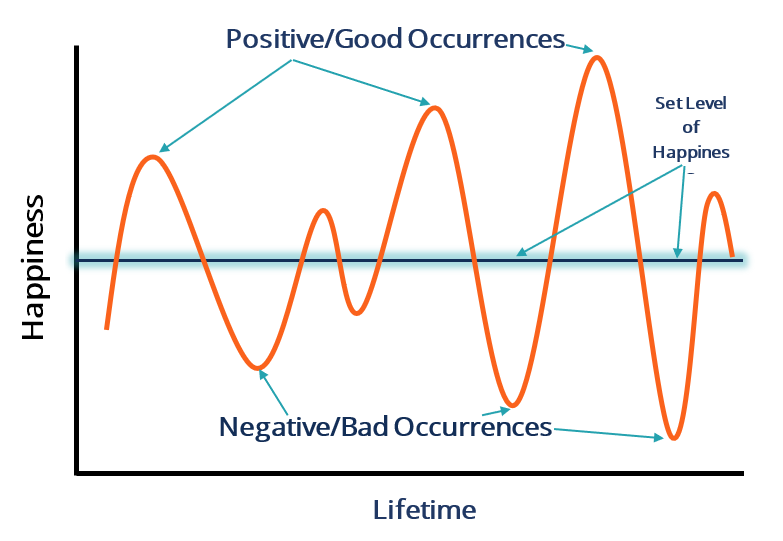
This phenomenon is called the hedonic treadmill1 or hedonic adaptation. It means humans tend to return to a stable level of happiness after extraordinarily good and bad events. Over our lives, we experience fantastic highs and tough lows, but we usually come back to a basic level of contentment. This can be shown on a graph like this:

Hedonic treadmill

So, how do we react to this information? Some of us might think, 'Humans are quite tough. We can bounce back from dark moments pretty quickly with time.' Others might wonder, 'What's the point of enjoying happy times if we'll just end up less happy again?'

Both reactions make sense. My response to that is to enjoy the positive moments to the fullest, knowing you'll probably return to a less happy state shortly after that really good event. On the other hand, knowing that difficult times will fade can make suffering a bit easier to bear, being sure that the light at the end of the tunnel isn't so far away.

We can use a similar approach in our jobs, especially in tech. Imagine two options: reworking the entire architecture from scratch, or examining current resources for inefficiencies and room for improvement. Taking inventory of the current architecture first might reveal new insights and quick fixes to tough problems.

Completely redoing the architecture usually takes longer, needs staff training in new technologies, and might lead to downtime. It's also quite expensive. On the other hand, finding areas to improve in the existing setup is usually quicker, cheaper, and easier. We can apply this to our personal lives too. Instead of seeking external solutions like alcohol, drugs, or shopping, we can reflect on what's draining us internally and take the first step to improve.

(like dogs)

With all that said, dogs are really good at this hedonic treadmill thing. Dogs have to be some of the happiest creatures on Earth. Take my dog, Luna, as an example. Luna has only a couple of possessions: her collar and her favorite toy (named Gussy). She doesn't need a new iPhone, she eats the same food, and does more or less the same things every day. Luna seems to maximize the happy moments, and quickly bounces back from a rut. Luna also doesn't need new things in her life constantly to feel happiness.

Let's try to be more like dogs in our daily lives.


  1. Brickman; Campbell (1971). Hedonic relativism and planning the good society